 Using KMyMoney for the first time
Table of Contents
- Running KMyMoney for the first time
- Creating a new file
- Creating accounts
- Scheduled transactions
- Categories
- Tags
- Payees
- Importing financial data from other applications
- Searching for transactions
- Reconciliation
- Backing up
- Launching KMyMoney
- How to move KMyMoney to a new computer
- Getting Help / Contacting the Developers / Reporting Bugs
Screenshots may differ
When you run KMyMoney, it might not look exactly like the screenshots in this manual. Many details, such as fonts, colors, and icons, can be customized, using the → menu item or the KDE System Settings application, depending on your operating system or distribution.
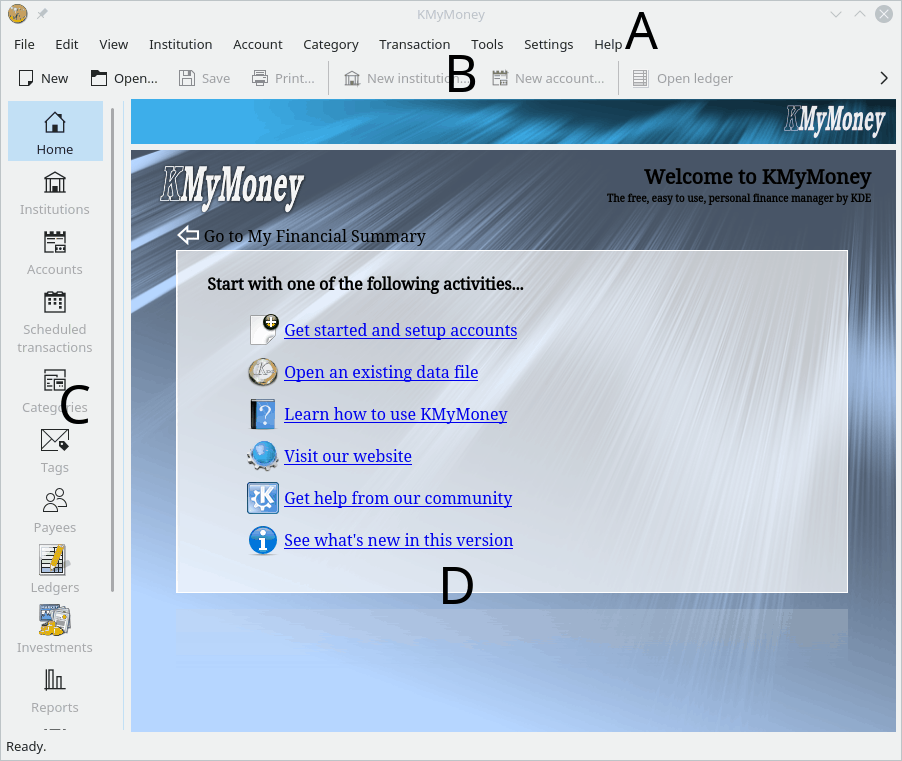
The KMyMoney main window consists of four major parts
A. The menu bar
B. The toolbar
C. The View selector
D. The view
The menu and toolbar provide access to the features of KMyMoney and allow you to Create a new data file, open an existing data file, or configure how KMyMoney operates. The toolbar can be configured to show icons for the operations you use most frequently.
On the left side of the main window, the View Selector consists of at least eleven icons with optional labels, depending upon the software provided by your system, as some features can be included or excluded when the program is compiled. More icons could be added by various plugins. By clicking one of the icon, the view window on the right hand side is loaded with the appropriate view of your financial data. Each view provides a unique representation of your financial situation and allows you to view or edit the information shown.
The View Selector may contain the following icons
 Home: a configurable overview of your current financial situation (or an introduction
page when no data file is open.)
Home: a configurable overview of your current financial situation (or an introduction
page when no data file is open.)
 Institutions: your institutions and accounts displayed in a hierarchy.
 Accounts: your accounts displayed in a hierarchy.
 Scheduled transactions: your recurring payments, income, and transfers.
 Categories: special accounts that provide a means for you to group associated
transactions.
Categories: special accounts that provide a means for you to group associated
transactions.
 Tags: special accounts that provide an additional means similar to Categories
for you to group associated transactions.
Tags: special accounts that provide an additional means similar to Categories
for you to group associated transactions.
 Payees: your payees - the people and organizations you pay money to or receive
money from.
Payees: your payees - the people and organizations you pay money to or receive
money from.
 Ledgers: your transactions in each account.
 Investments: your portfolio summary
 Reports: a collection of various, customizable displays of your financial data.
 Budgets: your budgets.
 Forecast: forecast of the balances of your accounts and categories.
 Outbox: a display provided by the KBanking plugin to provide feedback on
running processes.
Outbox: a display provided by the KBanking plugin to provide feedback on
running processes.
Remember that some of these may not be present on your system; it depends on how your copy of KMyMoney was configured and built.