 Adding Investments to Your Account
To add individual securities to your Investment Account, navigate to the View, select the tab, and choose the Investment account where the investment is held from the Select Account dropdown.
Right-click in any empty space in the view. This brings up the context menu. Choose from this menu. This launches the New Investment Wizard which you use to create your new Investment.
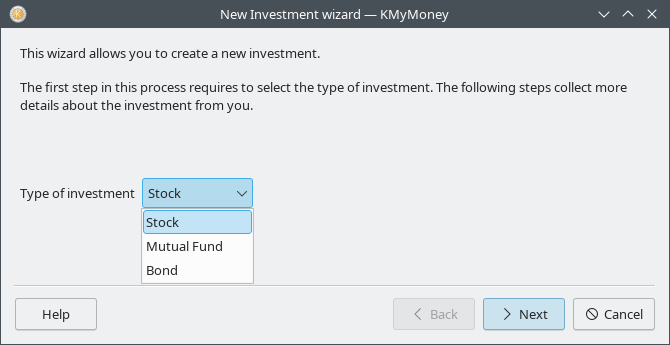
The first thing you will be asked to enter is the name of the investment. This is the name which will be used on the Equities Tab. You will also be asked to specify the type of investment. The currently available values are Stock, Bond, and Mutual Fund. If your investment is not strictly one of these types, it is ok to mislabel here, as the type is not currently used to restrict or control what you can do with the investment.
Next, the investment details page is presented. The following information is entered on this page:
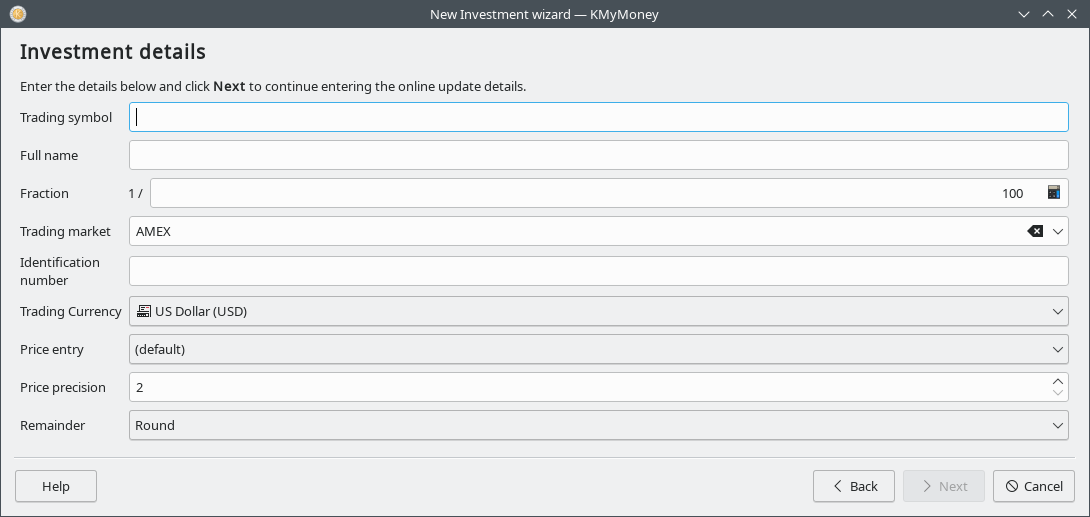
Trading Symbol. A trading or ticker symbol is an abbreviation used to identify a publicly traded security of a particular instrument on a particular market or exchange. KMyMoney requires a trading symbol for all securities; however some investments do not have symbols. In this case, you will need to make up a symbol for it.
The dropdown includes all trading symbols which currently exist in your data file. If you select one of these KMyMoney will reuse the referenced security for the new equity, unless you check the "Create duplicates of symbol," in which case a new security will be created with the same symbol.
If you plan to use Online Quotes to retrieve prices for this investment, ensure that the symbol exactly matches the symbol used by your quote source. Yahoo covers most of the world's markets, and requires a suffix on the end of symbols outside the US, to specify the country or market. For example, Rubicon Limited on the New Zealand market should be entered as “RBC.NZ”.
Full name of the investment, although it can be a friendly, readable name, e.g., “Advanced Micro Devices, Inc.” This name is also referred to as the security.
Fraction. This indicates the degree of precision to which your holdings are measured. For example, in the US most mutual funds measure holdings to three decimal places, so you would enter 1000 in this field. Stocks are often measured to only whole units, so you could enter 1 for a stock like this, but you would use 10000 for a stock measured to four decimal digits. You'll want to mirror the same decimal places that your brokerage uses to record your securities so the transactions amounts match within KMyMoney. Using extra precision will not cause a problem, but using too little precision can cause rounding errors which can make KMyMoney unable to exactly match the information shown by your brokerage institution.
Trading market. Where the investment is traded. This is an optional field which is provided for your convenience. This information is not used anywhere else within KMyMoney.
Identification number. An optional field to enter additional identification information you might like to keep track of. Stocks often have such a number, which can sometimes be used as well as the symbol for retrieving information about it. Again, this information is not used anywhere else.
Trading currency. The market exchange currency in which this investment is traded. This is typically the currency of the country that the security trades within. It is usually, but not necessarily, the same as the default currency for the Investment account holding that security.
Price entry. When you enter or edit a buy, sell, or reinvest transaction for this investment, this dropdown indicates whether you want to enter the price per share or the total for all shares or to follow the default for the account, which was specified when the Investment Account was created.
Price Precision. This is a small integer, specifying the number of decimal places used to specify the price of this investment in the specified currency. This is used for both purchase and sale price, the current price, and also for the total value of the investment.
Remainder. This is a dropdown with values Round, Ceil, Floor, and Truncate, which specifies what KMyMoney should do in the last decimal place of values. For example, this can be relevant when you specify the total price of a purchase rather than an exact price per share.
Finally, you're presented with the Online Update screen. This is where you tell KMyMoney how you would like to update the prices of your investment, if you do want to use an online source. The following items are set here:
Use Finance::Quote. This is an option for GnuCash users who are used to this style of quotes. Most users can leave this unchecked. Finance::Quote is a Perl module, so to use it, you would need to have both Perl and its Finance::Quote module installed.
Online Source. The online source you'd like to use for this particular investment. The most common choice is “Yahoo Finance”. Try that first, and if the investment cannot be found using this source, then experiment with the others.
Note that although KMyMoney knows how to extract security prices from web pages retrieved from Yahoo and many other sources, those sources have been known to change the format of those pages, which can prevent KMyMoney from successfully extracting the desired information. This is an unfortunately too frequent topic of discussion on the various support channels. However, if fetching prices works for a long time and then you start to get errors, please consider this possibility.
Factor. A multiplier that should be applied to quotes retrieved for this investment. This is most commonly needed for UK stocks where the price quoted is in pence (1/100), and the stock is denominated in pounds. In this case, enter 0,01 for the Factor.
Caution
It is possible to own shares of the same security in more than one investment account, such as a regular investment account and also a retirement account. In previous versions of KMyMoney it was easy to unintentionally have KMyMoney treat them as if each of the securities was a different underlying investment. That often caused confusion, as well as duplicate storage, such as having two copies of the entire price history of the equity. Currently, it is much easier to avoid this situation, but it is important to pay attention when creating new equities within an Investment Account.
When you add a security to an investment account, and that investment already exists in another investment account, you need to be careful if you want to reuse it rather than creating a new, duplicate entry. In the New Investment Wizard, after selecting the name and type of investment and clicking , when you select an existing Trading Symbol some of the other fields on the form will be filled in with the relevant information from the existing security, and the existing security will be used unless you select the "Create duplicate of symbol" checkbox.