 Browser
This tab allows you to customize the behavior of the internal browser tabs.
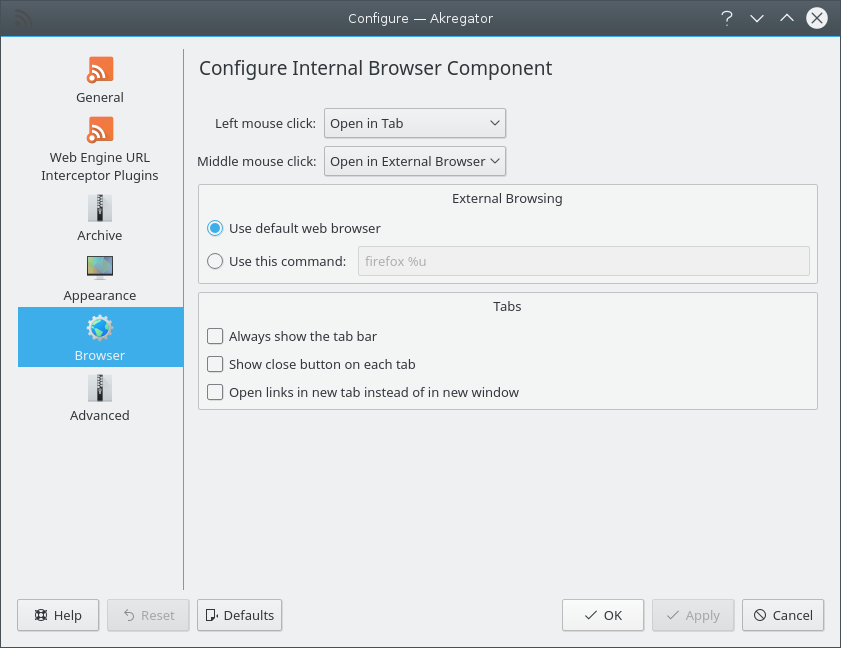
- Left mouse click
You can choose three actions for the Left mouse click action: Open in Tab (open the link in a tab and put this tab in focus), Open in Background Tab (open the link in a tab but keep the current tab in focus) and Open in External Browser to open an article in a new window with your default browser.
- Middle mouse click
As above, you can set one of the three actions for the middle mouse click.
- External Browsing
- Use default web browser
If this is checked, Akregator will use the web browser you set in System Settings. It may be the KDE default, Konqueror, or another browser depending on what you set here.
- Use this command:
You can use another web browser for Akregator other than your KDE default. If you wish to do so, check this option and enter the command for the browser, provided it is in your $
PATH.
- Tabs
- Always show the tab bar
If this option is checked, the tab will be always shown, even when only one tab is open. This allows you to create tabs directly from the tab bar. Otherwise, the tab bar will be shown only when several tabs are open.
- Show close button on each tab
If this option is checked, the close button will appear when you move your mouse on the left side of the tab title so you can more easily close tabs.
- Open links in new tab instead of in new window
If checked, Akregator will open a link which would normally open in a new window (external browser) in a new tab instead.
- Security
- Verify URLs using Google's Safe Browsing API
If this option is checked, Google Safe Browsing API will be used to check URLs against Google's constantly updated lists of unsafe web resources. Examples of unsafe web resources are social engineering sites (phishing and deceptive sites) and sites that host malware or unwanted software.
- Enable Javascript
If checked, Akregator will use JavaScript when processing web resources. JavaScript usage has several security implications.
- Misc
- Access Key Enabled
This is an accessibility option. When checked, Akregator will process the web page accessKey property, which defines the keyboard shortcut used to jump to a given element.