 View Mode
View Mode displays full-size images. The same sidebar available in Browse Mode is displayed on the left. At the bottom, there is the Thumbnail Bar, which allows you to scroll through the images in the current folder. The Thumbnail Bar can be unfolded by clicking on the button. Clicking again will fold it. To change the size of the thumbnails move the splitter with the mouse button.
View Mode supports viewing multiple images side-by-side. You may select multiple images in Browse Mode before switching to View Mode, or you may click the button that appears when hovering over images in the Thumbnail Bar to add a pane displaying that image. A will then appear that will permit you to remove its pane.
When multiple images are displayed, a small toolbar appears below each image that permits you to delete the image or remove its pane. You may perform zoom operations independently for each image, or synchronize them. Toggle this by checking the Synchronize to the left of the zoom slider or by pressing Ctrl+Y. You can switch images by clicking on their pane, or using your keyboard. To switch to the image on the right, press Tab. To switch to the image on the left, press Shift+Tab.
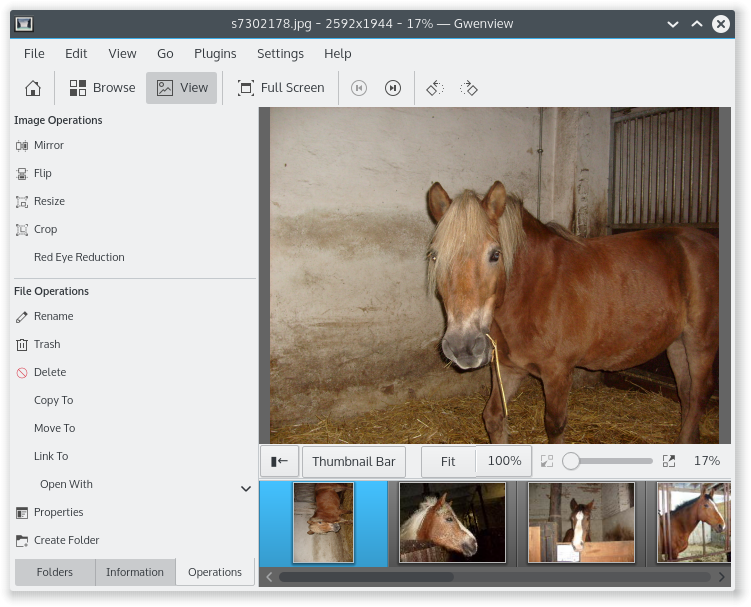
The slider at the bottom right controls the zoom of the image. The , and buttons are next to the zoom slider and are three preset zoom levels. The button zooms the current image to fit the size of the window, the button zooms the image to fill the window by fitting width or height and the button zooms the image to the actual pixel size. The shortcut F toggles between mode and , pressing Shift+F will toggle respectively.
When an image is in zoom-to-fit mode, you can go to the previous and next image with the arrow keys. When you zoom in, arrow keys are used to scroll the image. This is very similar to the behavior provided by phones or digital cameras.
When an image is zoomed in, a bird's eye view appears and lets you scroll the image using the mouse and the arrow keys. The bird's eye view automatically hides itself after a short delay, showing back only while zooming or scrolling. The bird's eye view can be disabled from the right click context menu or from →
You can define what happens when going to image B after having zoomed in on an area of image A using the options in the Zoom mode group on the page of the Gwenview configuration window which can be reached using the → .
If set to Autofit each image, image B is zoomed out to fit the screen.
If set to Keep same zoom and position, all images share the same zoom and position: image B is set to the same zoom parameters as image A (and if these are changed, image A will then be displayed with the updated zoom and position).
If set to Per image zoom and position, all images remember their own zoom and position: image B is initially set to the same zoom parameters as image A, but will then remember its own zoom and position (if these are changed, image A will not be displayed with the updated zoom and position).
Tip
You can start directly in View mode by starting Gwenview from a context menu like in another program or by launching it from the command line with an image as an argument.
The following additional image operations are available only in View Mode:
→ (Shift+C): This operation lets you discard parts of the image you don't want.
You can access the advanced cropping parameters by ticking Advanced settings check box on the bottom popup pane. Use the corresponding fields to tune up the cropping operation.
It is also possible to adjust the cropped area by dragging the gray square handles on the borders of the image. You can move the cropped area by clicking and holding the mouse button and drag it with the mouse pointer.
Press the button to see the results when you are ready. Use the upper popup pane to save the results or undo/redo the operation.
→ : This operation reduces the "red eye" effect commonly found in photographs taken with a flash camera.